
Purpose:
The New Field Service workflow is designed for service orders that require physical field work (truck rolls). Its primary purpose is to allow customers to request truck rolls for scenarios such as:
● Router installations
● Drop bury requests
● On-site equipment work
● Other field-related service needs
By providing a structured workflow for these requests, we reduce the need to create traditional Trouble Tickets for work that is operational rather than diagnostic in nature.
Who will have access:
● CSRs
● Combo Techs
● Operations
Document Contents
New Field Service
Purpose
Who will have access
Workflow Overview
Job Assignment
Deployment Status Updates
Work Completion
Enforced Validation Step
How It Works
Field Service Plan
Optional Features
New Service Request
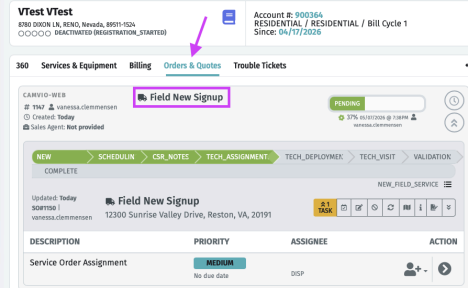
Service Order
Limitations / Future Developments
Current Limitations
Workflow Overview
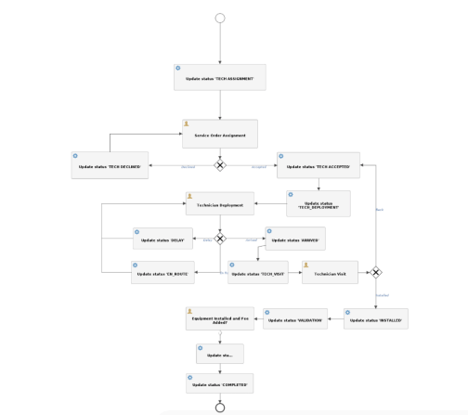
1⃣Job Assignment
A technician accepts or declines the field job.
2⃣Deployment Status Updates
Once accepted, the technician updates their deployment status as the job progresses:
● Delayed
● En Route
● Arrived
3⃣Work Completion
After arriving on site and completing the required work, the technician selects:
● Installed
4⃣Enforced Validation Step (Customizable)
Before the workflow can complete, the technician must confirm that required operational tasks were performed, including:
● Billing fees were added
● Service Order notes were entered
● Required equipment updates were completed
This final validation step ensures billing accuracy, documentation completeness, and proper service order lifecycle management before the job is marked complete.
How It Works
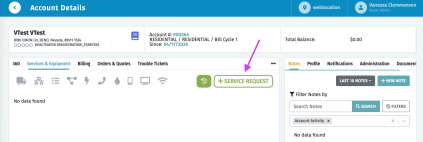
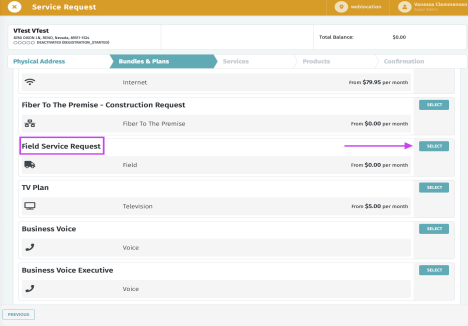
To initiate the Field Service workflow, a New Service Request must be created.
In order for this request to trigger the workflow:
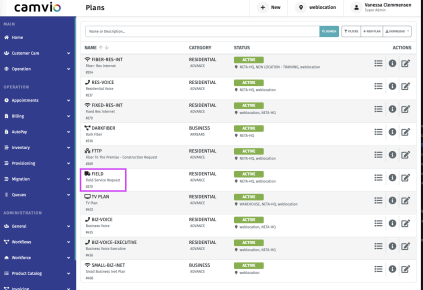
● a Plan configured under the Field Service model is required.
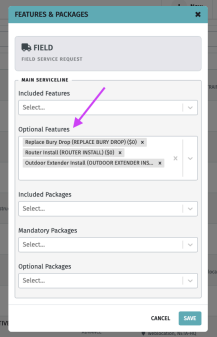
● That plan must include one or more optional features.
● These optional features must also be created under the Field Service model.
The purpose of these features is to allow customers (with the appropriate permissions) to select and manage the specific reasons for requesting a truck roll. This provides flexibility and supports multiple field service scenarios without requiring separate plans.
Because the features are optional, customers are not required to select one in order to submit a service request. This ensures that a Field Service request can still be created even if none of the predefined options apply.
Field Service Plan
Optional Features
New Service Request
Service Order
Limitations / Future Developments
While the New Field Service workflow provides a structured process for managing truck rolls, there are current limitations that should be noted.
Current Limitations
1⃣No Service Line Selection During Request
At this time, the workflow does not allow users to select the specific Service Line on an existing account when creating the Field Service request.
This means:
● The workflow operates at the Service Order level.
● Any Service Line–specific updates must be handled manually during fulfillment.
2⃣No Automatic Fee Application
Optional features attached to the Field Service plan do not automatically add billing fees to the account.
Currently:
-
Fees must be manually added by the technician or appropriate user.
-
Technicians can add total hours under Service Order Notes for future fee addition on hourly charges.
-
Fees will be manually added via Billing > OCC > Adjustments > Charges.
-
The workflow does not inject billing line items based on selected features.
3⃣Validation is Manual (Not System-Enforced)
The final validation step requires the technician to confirm:
● Equipment was added to the Service Line
● Billing fees were added
● Service Order notes were entered
However, the system does not programmatically verify that these actions were performed correctly.
The workflow relies on user confirmation rather than automated validation against account records.